

OS Part 1: Introduction 👁️

That Indian Dev 🇮🇳
Welcome to Part 1 of our blog series on operating systems! In this instalment, we will explore the essential features and functionalities of operating systems, including resource management, abstraction of hardware complexities, and program execution facilitation. We will also delve into the goals of an ideal operating system, the different types of operating systems, and the fundamental concepts of programs, processes, and threads.
Definition
An operating system is a piece of software that manages all the resources of a computer system, both hardware and software and provides an environment in which the user can execute his/her programs conveniently and efficiently by hiding the underlying complexity of the hardware and acting as a resource manager.
Features of an Operating System
Operating systems offer several key features that are essential for efficient computer usage:
Access to Computer Hardware: An operating system acts as an intermediary, facilitating communication between users and computer hardware. It provides an interface that allows users to interact with the hardware without delving into complex technicalities.
Resource Management: The OS plays a vital role in resource management, commonly known as arbitration. It efficiently allocates and manages resources such as memory, devices, files, security measures, and processes, ensuring that each application receives its fair share and operates optimally.
Abstraction of Hardware Complexity: One of the key responsibilities of an operating system is to hide the intricate details of the underlying hardware. By abstracting complexities, the OS provides a simplified and standardised interface for application programs, allowing developers to focus on building software rather than grappling with hardware intricacies.
Execution Facilitation: Operating systems enable the execution of application programs by providing isolation and protection. They create a secure environment in which applications can run, shielding them from potential conflicts with other programs and ensuring data integrity.
Goals of an Ideal Operating System
Maximum CPU Utilisation: One of the primary objectives of an operating system is to harness the full potential of the central processing unit (CPU). By effectively managing system resources and minimising idle time, OS designers strive to ensure that the CPU is utilised to its maximum capacity. This optimisation not only boosts overall system performance but also ensures that computational power is fully utilised, resulting in faster and more efficient task execution.
Mitigating Process Starvation: Process starvation, where certain tasks or processes are unjustly deprived of the necessary resources to execute efficiently, can severely impact system performance. Operating systems tackle this issue by implementing intelligent scheduling algorithms that ensure fair distribution of resources among running processes. By preventing process starvation, OS designers create an environment where every task receives adequate resources, thereby enhancing overall system stability and responsiveness.
Job Prioritisation: In a dynamic computing environment, certain tasks or jobs may require immediate attention or have higher priority over others. Operating systems incorporate mechanisms to identify and prioritise these critical tasks, ensuring they receive the necessary resources and are executed promptly. By effectively managing job priorities, OS designers guarantee that essential processes are not delayed or hindered by lower-priority tasks, leading to improved system efficiency and user satisfaction.
Types of Operating Systems
Single Process OS: In this system, only one process is allowed to execute at a time from the ready queue. While simple in design, this approach limits the system's multitasking capabilities and may lead to inefficiencies when handling I/O operations. Example: MS-DOS
Batch Processing OS: Traditionally used with punch cards, batch-processing systems involve users preparing jobs and submitting them to a computer operator. The operator then organises similar jobs into batches, which are sequentially submitted to the processor for execution. However, this method lacks priority assignment and may result in job starvation or CPU idle time during I/O operations. Example: ATLAS
Multiprogramming OS: Designed to increase CPU utilisation, multiprogramming systems keep multiple jobs in memory simultaneously. With context switching between processes, the CPU remains active even when a process is waiting for I/O. While responsive, this approach still relies on a single CPU. Example: THE
Multitasking OS: An extension of multiprogramming, multitasking allows for the simultaneous execution of multiple tasks on a single CPU. By utilising context switching and time-sharing, these systems enhance responsiveness and further reduce CPU idle time. Example: CTSS
Multi-Processing OS: Leveraging the power of multiple CPUs within a single computer, multi-processing OS offer increased reliability and throughput. If one CPU fails, the others can continue functioning, minimising disruptions. Additionally, process starvation is reduced as tasks can be distributed across multiple CPUs. Example: Windows
Distributed OS: Going beyond a single computer, distributed operating systems manage various resources, including multiple CPUs, memory units, and GPUs. They consist of loosely connected, autonomous, and interconnected computer nodes that communicate and collaborate. This architecture enables parallel processing and fault tolerance, ideal for large-scale computing environments. Example: Solaris
Real-Time OS (RTOS): Tailored for applications requiring error-free computations within strict time boundaries, real-time operating systems are used in critical systems like air traffic control or robotics. They prioritise time-critical tasks, ensuring prompt and predictable execution. Example: ATCS
Programs, Processes, and Threads
It is essential to understand the fundamental concepts of programs, processes, and threads. These terms are often used interchangeably but represent distinct elements in the execution of tasks on a computer.
Programs
A program refers to an executable file that contains a set of instructions written to perform specific operations on a computer. It is a compiled code, ready to be executed by the computer's operating system. Programs are typically stored on the disk and can be executed whenever needed.
Example: Consider a simple program called "Calculator.exe." This program allows users to perform mathematical operations such as addition, subtraction, multiplication, and division. When you double-click on the "Calculator.exe" file, the program is loaded into memory, and you can interact with its user interface to perform calculations.
Processes
A process is an instance of a program that is currently being executed. When a program is launched, it becomes a process residing in the computer's primary memory, also known as Random Access Memory (RAM). Each process has its memory space and system resources allocated to carry out its tasks.
Example: Let's say you have two instances of a web browser, Firefox and Chrome, running simultaneously on your computer. Each browser represents a separate process with its memory space and system resources. This separation ensures that if one browser crashes, it won't affect the other one.
Threads
Threads are the smallest units of execution within a process. They represent independent paths of execution and enable concurrent execution of multiple tasks within a program. Threads are often referred to as lightweight processes because they share the same memory space and resources within a process.
Example: Consider a text editor application where you are typing, spell-checking, formatting text, and saving your work simultaneously. These different tasks can be executed concurrently using separate threads within the text editor process. While you are typing, another thread can handle the spell-checking and formatting processes in the background, ensuring smooth and efficient multitasking.
Multi-Tasking vs Multi-Threading
| Multi-Tasking | Multi-Threading | |
| Definition | The execution of more than one task simultaneously | A process is divided into several different sub-tasks called threads, each having its own path of execution |
| Context Switching | The concept of more than 1 process being context switched | The concept of more than 1 thread within a process being context switched |
| Number of CPUs | Can be achieved using a single CPU | Can’t be achieved using a single CPU. Needs two or more CPUs |
| Isolation and Protection | Isolation and memory protection exist | No isolation and memory protection. Threads share the same memory and resources allocated to the process |
| Memory and Resources | OS allocates separate memory and resources to each program | OS allocates memory to a process, and multiple threads within that process share the same memory and resources allocated to the process |
Components of OS
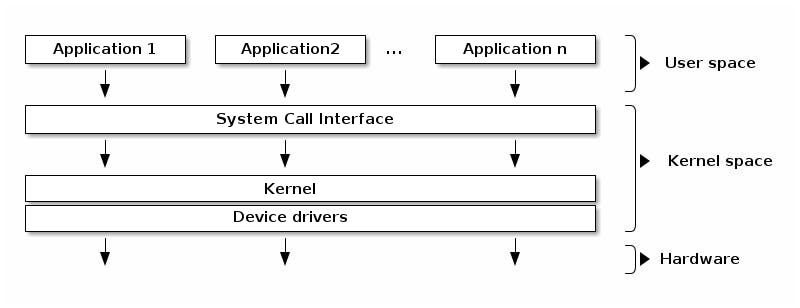
User Space: The user space refers to the domain within an operating system where application software operates. Unlike the kernel, applications running in the user space do not have privileged access to the hardware resources. Instead, they interact with the kernel to request necessary services and leverage the underlying hardware efficiently. Key features of the user space include:
Graphical User Interface (GUI): The user space provides a platform for the execution of applications that utilise graphical user interfaces. GUI-based applications offer users an intuitive and visually appealing means of interacting with the system and its functionalities.
Command-Line Interface (CLI): The user space also accommodates applications that operate through a command-line interface. CLI-based applications allow users to interact with the operating system by issuing text-based commands, providing flexibility and powerful control over system operations.
Kernel: At the heart of any operating system lies the kernel, which serves as the critical interface between the hardware and software layers. It performs essential tasks and facilitates seamless communication with the underlying hardware components. It provides the foundation upon which all other functionalities are built. Notable characteristics of the kernel include:
Heart of the OS: The kernel represents the core of the operating system, acting as the central processing unit that orchestrates various operations and manages system resources efficiently.
Initial Startup Component: During the boot process, the kernel is the very first part of the operating system to load, ensuring that essential services and functionalities are up and running from the outset.
In conclusion, Part 1 of our blog series offered a comprehensive overview of operating systems, examining their features, goals, types, and fundamental concepts such as programs, processes, and threads. In Part 2, we will take a deeper dive into the internal mechanisms of operating systems, specifically focusing on the pivotal role of kernels in process management, memory management, file systems, and inter-process communication.


